Lesson 1.3: The Game Loop and Network Threading
Welcome to Lesson 3! Now that you understand network architectures and transport protocols, it's time to integrate networking into the beating heart of your game: the game loop. How you structure your loop—and how you thread network operations—directly affects responsiveness, determinism, and the ability to scale. Let's dive in!
Learning Objectives
TIP
By the end of this lesson, you will be able to:
- Explain the difference between fixed timestep and variable timestep.
- Describe how to decouple network operations from the game loop.
- Implement a simple two-thread client-server model.
- Understand common pitfalls like race conditions and lock contention.
1. The Game Loop — A Brief Refresher
Most games run on a loop that repeats dozens of times per second. At its simplest, the loop does three things:
- Process input (keyboard, mouse, gamepad, network messages)
- Update the game state (physics, AI, logic) based on input and elapsed time
- Render the current state to the screen
while (game_running) {
    process_input();
    update(delta_time);
    render();
}
In a single-threaded implementation, each step blocks the next. If update() takes too long, rendering stutters. If render() blocks, input lags. This tight coupling is fine for simple games, but when networking enters the picture, things get more complex.
2. Fixed Timestep vs. Variable Timestep
The delta_time passed to update() determines how far the simulation advances. There are two primary strategies:
Variable Timestep
- You measure the actual time elapsed since the last frame and pass that to
update(). - Simple to implement.
- Problem: If delta_time varies, physics and networking become non-deterministic. A fast machine runs the simulation with smaller steps; a slow machine may skip large chunks. In networked games, this makes state synchronization extremely difficult because two clients may advance the world differently.
Fixed Timestep
- You advance the simulation in discrete, constant-sized steps (e.g., 50 steps per second, each 20 ms).
- The update loop may run multiple times per render frame to catch up.
- Benefits: Deterministic behavior, easier networking, consistent physics.
- Downside: Slightly more complex to implement.
accumulator += time_since_last_frame;
while (accumulator >= FIXED_DT) {
    update(FIXED_DT);
    accumulator -= FIXED_DT;
}
render(accumulator / FIXED_DT); // Interpolation factor
Most professional networked games use a fixed timestep for the simulation (the "tick rate") and a separate, variable render rate for smooth visuals.
TIP
In this pattern, the simulation always runs at the same rate, while rendering interpolates between states for smoothness.
3. Where Does Networking Fit?
Network communication introduces two new requirements:
- Sending data: Inputs must be sent to the server, and server state must be broadcast to clients.
- Receiving data: Incoming packets must be processed at the right time.
If you handle networking inside the same thread as the simulation, network latency or packet loss can stall your update loop. Worse, a slow network read could cause your game to stutter.
The solution is decoupling: moving network operations to separate threads so that the simulation and rendering continue uninterrupted.
4. Threading Models for Networked Games
Single-Threaded with Non-Blocking Sockets
You can use non-blocking sockets and poll for new data at the start of each frame. This keeps everything in one thread but requires careful management of socket states.
| Aspect | Description |
|---|---|
| Pros | Simple, no threading complexity |
| Cons | Polling adds overhead; still vulnerable to brief stalls if a socket operation blocks |
Two-Thread Model — Network Thread + Main Thread
A common pattern:
- Main thread: Handles input, update, and render.
- Network thread: Dedicated to reading from sockets, writing to sockets, and processing low-level protocol logic.
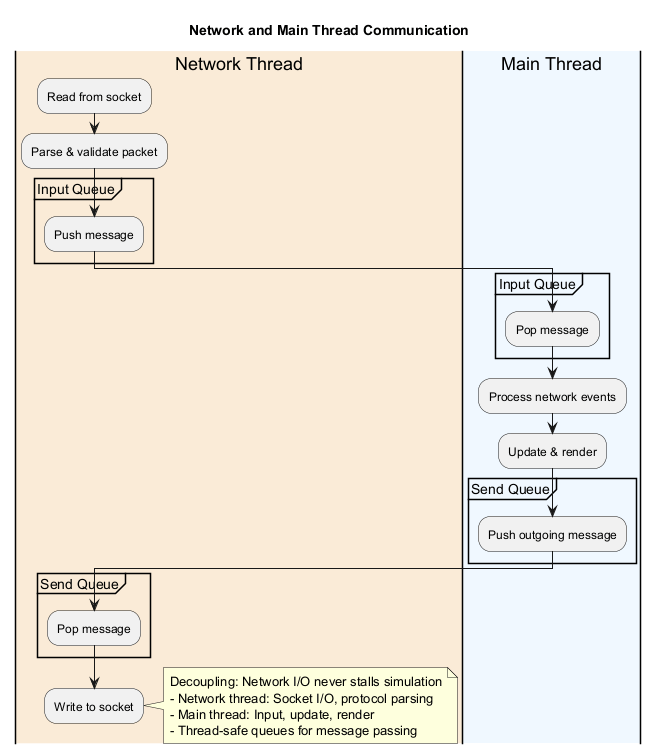
The network thread pushes incoming messages into a thread-safe input queue. The main thread consumes that queue during its update phase. Outgoing messages are placed into a send queue and transmitted by the network thread.
This decoupling ensures that a burst of network activity does not stall the simulation.
Three-Thread Model — Network, Simulation, Render
For advanced games, you might separate simulation (update) from rendering entirely. The simulation runs on its own thread at a fixed tick rate, while the render thread reads the latest state and interpolates. The network thread communicates with the simulation thread.
INFO
This is the model used by many AAA engines (e.g., Unity's job system, Unreal's networking threads).
5. Example: A Simple Client-Server with Decoupled Threads
Let's walk through a minimal implementation in pseudocode. We'll create a server that runs a fixed-timestep simulation (20 Hz) and clients that render at 60 Hz while receiving updates from the server.
Server Side (Simplified)
// Server main loop – runs at 20 Hz
float fixedDt = 0.05f; // 20 ticks per second
while (server_running) {
    float startTime = GetTime();

    // Read all incoming player inputs from the network thread
    lock (inputQueue) {
        foreach (var input in inputQueue) {
            ApplyInputToPlayerState(input);
        }
        inputQueue.Clear();
    }

    // Update game world
    UpdateWorld(fixedDt);

    // Broadcast new state to all clients
    byte[] snapshot = SerializeState();
    foreach (var client in clients) {
        SendToClient(client, snapshot);
    }

    // Sleep to maintain fixed rate
    float elapsed = GetTime() - startTime;
    float sleepTime = fixedDt - elapsed;
    if (sleepTime > 0) Thread.Sleep(sleepTime);
}
Client Side — Two Threads
Network Thread (runs continuously):
while (client_connected) {
    // Receive a snapshot from the server (blocking read)
    byte[] snapshot = ReceiveFromServer();

    // Push into a thread-safe queue for the main thread
    lock (snapshotQueue) {
        snapshotQueue.Enqueue(snapshot);
    }
}
Main Thread (game loop):
float accumulator = 0;
GameState currentState = new GameState();
GameState previousState = new GameState();

while (game_running) {
    float frameTime = GetDeltaTime();
    accumulator += frameTime;

    // Check for new snapshots from the network thread
    lock (snapshotQueue) {
        while (snapshotQueue.Count > 0) {
            previousState = currentState;
            currentState = DeserializeState(snapshotQueue.Dequeue());
        }
    }

    // Fixed timestep update loop (optional if we only interpolate)
    while (accumulator >= FIXED_DT) {
        accumulator -= FIXED_DT;
    }

    // Interpolate between previous and current state
    float alpha = accumulator / FIXED_DT;
    RenderState = Interpolate(previousState, currentState, alpha);

    // Render
    Render(RenderState);

    // Send player inputs to the server (via network thread send queue)
    SendInputToNetworkThread();
}
This design allows the client to render smoothly at 60 Hz even if the server sends updates at only 20 Hz. The interpolation between snapshots makes motion appear smooth, while the separate network thread prevents packet processing from interfering with rendering.
6. Common Pitfalls and Solutions
Race Conditions and Lock Contention
Sharing queues between threads requires synchronization. Using locks (lock in C#, std::mutex in C++) is straightforward but can cause contention. For high-performance games, consider lock-free queues (e.g., using ConcurrentQueue or custom atomic structures).
Thread Safety in Game State
The main thread should never modify state that the network thread is reading. In the example above, the server makes a copy of the state before sending, or uses a double-buffer pattern.
Over-Interpolation
Interpolating between snapshots adds a small delay (one snapshot interval). For fast-paced games, you may combine interpolation with client-side prediction (covered in later lessons).
Sleeping to Maintain Fixed Timestep
Simple Thread.Sleep() is not precise enough for competitive games. Instead, use high-resolution timers and spin-wait for the remainder of the tick. Game engines often implement a "busy loop" that yields only when necessary.
WARNING
Avoid using Thread.Sleep() for precise timing in production games. It can cause inconsistent frame times and input lag.
Hands-On Tasks
Task 1: Build a Simple Server
- Create a server that maintains a simple game state (e.g., a moving ball position).
- Run the server at a fixed tick rate (e.g., 10 Hz).
- Broadcast the position to all connected clients.
Task 2: Build a Client with Two Threads
- Implement a client with a network thread that receives snapshots.
- The main thread should interpolate between snapshots for smooth rendering.
- Measure the frame rate and observe how interpolation smooths out low-rate server updates.
Task 3: Experiment with Thread Safety
- Try sharing state directly between threads without locks.
- Observe race conditions and understand why synchronization is needed.
- Implement a thread-safe queue to pass data between threads.
Summary
Key Takeaways
- Decouple networking from the game loop to prevent stalls and maintain responsiveness.
- Fixed timestep for simulation ensures deterministic behavior, which is essential for network synchronization.
- Use thread-safe queues to pass data between network and simulation threads.
- Interpolation between snapshots lets the client render smoothly even when server updates are infrequent.
- Choose a threading model that matches your scale: single-threaded with non-blocking I/O for simple games, multi-threaded for production titles.
Check Your Understanding
- Why is fixed timestep preferred over variable timestep for networked games?
- What is the purpose of the accumulator in a fixed timestep loop?
- Describe the two-thread model for networked games. What does each thread do?
- What is head-of-line blocking, and why is it a problem?
- Why is interpolation used between server snapshots?
Click to see answers
- Fixed timestep ensures deterministic behavior—every machine advances the simulation by the same amount, making network synchronization possible.
- The accumulator tracks elapsed time since the last update, allowing the game to run multiple fixed-timestep updates if the frame rate drops, or skip updates if running ahead.
- The network thread handles all socket operations (sending/receiving packets), while the main thread handles input, update, and render. They communicate via thread-safe queues.
- Head-of-line blocking occurs when a lost packet delays all subsequent packets. In TCP, this causes sudden lag spikes.
- Interpolation smooths out the visual representation between server updates, allowing the client to render at a higher frame rate than the server sends updates.
Additional Resources
- Fix Your Timestep (Gaffer on Games)
- Multithreading in Game Engines (GitHub)
- C# ConcurrentQueue Documentation
Next Up
Now that we have a solid foundation in game loop design and threading, the next lesson will tackle one of the most challenging aspects of online games: state synchronization methods. We'll explore snapshot interpolation, deterministic lockstep, and how to keep players in sync across unreliable networks!