Lesson 1.1: Introduction to Online Game Architectures
Welcome to the first lesson of your online game development journey! In this lesson, we'll explore the fundamental architectural patterns that define how multiplayer games handle communication, authority, and state synchronization. Understanding these architectures is crucial because they impact everything from cheating vulnerability to server costs and player experience.
Learning Objectives
TIP
By the end of this lesson, you will be able to:
- Explain the three core network architectures: Peer-to-Peer, Client-Server, and Listen Server.
- Compare the strengths and weaknesses of each architecture.
- Identify which architecture is appropriate for different game types and player counts.
- Analyze real-world games to determine their network architecture.
1. What is Network Architecture?
Every online game faces a fundamental challenge: how do you get multiple computers to agree on the same game state, in real time, across an unreliable network? The answer lies in the game's network architecture—the blueprint that defines:
- Who talks to whom (topology)
- Who holds authority over the game state
- How state is shared between participants
Choosing the right architecture is one of the most consequential decisions a game developer makes. It impacts cheating vulnerability, server costs, player experience, and even the types of gameplay you can support.
2. Peer-to-Peer (P2P) — Everyone's an Authority
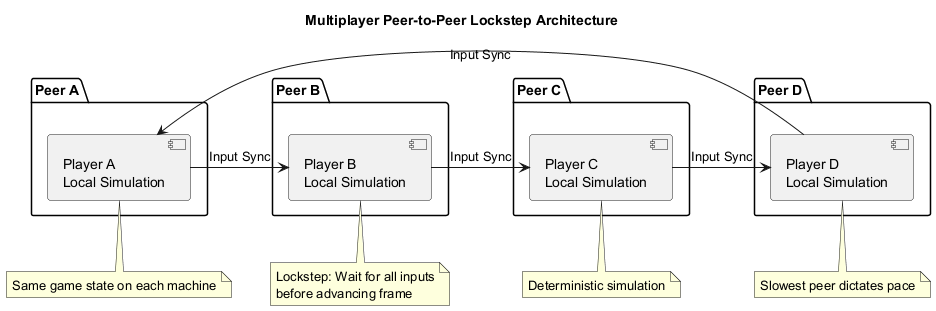
In a pure peer-to-peer architecture, every player's machine communicates directly with every other player. There is no central server; instead, the game state is distributed across all participants.
How It Works
Each peer runs the same simulation locally. To keep everyone in sync, games often use a technique called lockstep: players send only their inputs to each other, and every machine advances the simulation only when it has received inputs from all players for that frame. This ensures determinism but also means that the slowest peer dictates the pace for everyone.
Pros and Cons
| Aspect | Description |
|---|---|
| Pros | No server hosting costs |
| Simple to set up for small groups | |
| Can work without an internet connection (LAN) | |
| Low latency between peers in ideal conditions | |
| Cons | Every player's connection affects everyone else |
| NAT traversal can be difficult (players may need to forward ports) | |
| High cheating vulnerability — any peer can modify its own state | |
| Scalability is poor (bandwidth grows O(n²)) |
Real-World Examples
- Early Age of Empires — used P2P lockstep; if one player lagged, the whole game stuttered.
- Super Smash Bros. (netplay) — community tools simulate P2P with rollback netcode to mask latency.
- Minecraft (LAN mode) — a direct P2P connection when players join the same local network.
TIP
P2P is rarely used for large-scale commercial titles today, but it remains popular for LAN parties, indie games with small player counts, and as a fallback mode.
3. Client-Server — The Authoritative Model
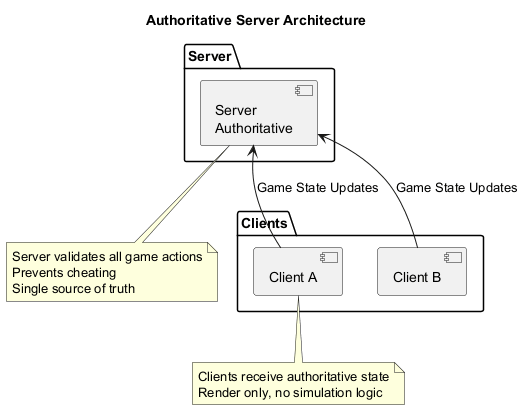
In a client-server architecture, a dedicated server (or fleet of servers) acts as the single source of truth. Clients send their inputs to the server; the server runs the game logic and sends back the authoritative game state. Clients are essentially "dumb" terminals that render what the server tells them.
How It Works
The server is authoritative — it validates all actions, resolves conflicts, and decides the final outcome. This makes cheating significantly harder because clients cannot directly modify the game state. The server can also perform lag compensation techniques (covered in later lessons) to provide a responsive feel despite network latency.
Pros and Cons
| Aspect | Description |
|---|---|
| Pros | Strong anti-cheat (server is trusted) |
| Consistent experience regardless of player hardware | |
| Scales well horizontally (add more servers) | |
| Enables advanced matchmaking and persistent worlds | |
| Cons | Requires hosting infrastructure (costs money) |
| Single point of failure if not scaled properly | |
| Always-online requirement | |
| Higher development complexity |
Real-World Examples
- Valorant, League of Legends, Overwatch — dedicated servers handle all game logic.
- World of Warcraft — the ultimate example of authoritative server with persistent world state.
- Fortnite — uses Epic's cloud-based dedicated servers for each match.
TIP
Client-server is the standard for competitive online games, MMOs, and any title where security and consistency are paramount.
4. Listen Server — The Hybrid Approach
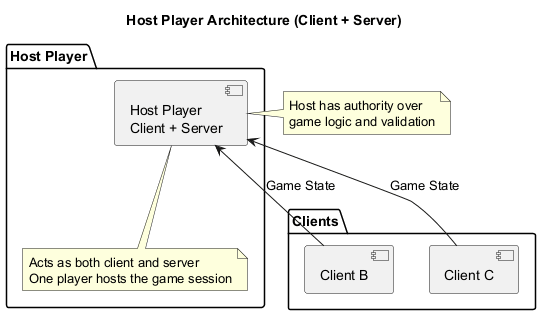
A listen server is a blend of P2P and client-server. One player's machine acts as both a client (rendering the game) and a server (running the game logic). Other players connect to that machine as clients.
How It Works
The hosting player runs the authoritative server logic locally. This gives them a slight advantage — zero ping to the "server" — and the game ends if they disconnect unless host migration is implemented (where another player takes over as host). Listen servers are common in cooperative games and private matches.
Pros and Cons
| Aspect | Description |
|---|---|
| Pros | No dedicated server required — players host |
| Easy for small groups to play together | |
| Lower operating costs for developers | |
| Cons | Host has a latency advantage |
| Host leaving can end the game (unless host migration works) | |
| Cheating is possible if the host modifies their client |
Real-World Examples
- Call of Duty (private matches) — one player hosts, others join. Recent titles also offer dedicated servers for ranked play.
- Left 4 Dead — campaigns are hosted by one player; if they leave, the game migrates to another player.
- Minecraft (open to LAN) — turns a single-player world into a listen server that others on the same network can join.
TIP
Listen servers strike a balance for games that don't require the full reliability of dedicated servers but need more structure than pure P2P.
5. Side-by-Side Comparison
| Feature | Peer-to-Peer | Client-Server | Listen Server |
|---|---|---|---|
| Authority | Distributed | Central (company-owned) | Central (player-owned) |
| Cheating Vulnerability | High | Low | Medium (host can cheat) |
| Scalability | Poor | Excellent | Limited by host's bandwidth |
| Cost to Developer | None (players host) | High (servers, bandwidth) | None |
| Host Disconnect Impact | Game may stop or continue with reduced players | Game unaffected (server stays up) | Game ends or migrates |
| Typical Use | LAN parties, small indie titles | Competitive, MMO, large-scale online | Cooperative, private matches |
6. Case Study: Minecraft — An Architecture for Every Occasion
Minecraft (Java Edition) is a fascinating case because it supports all three architectures, depending on how you play:
- Single-player → Open to LAN: This creates a listen server. Your client becomes the server, and other players on the same network can join. If you leave, they are kicked.
- Multiplayer with a dedicated server: Players download the server software and run it on a machine (or rent one). This is a client-server model, with the server being authoritative.
- Direct LAN without a dedicated server: If players simply join a friend's game without a dedicated server, it's effectively P2P via the listen server model, but the host still has authority.
Each mode trades off convenience, cost, and reliability. For a public server with dozens of players, the dedicated client-server model is essential. For a quick game with a friend on the same couch, the listen server is perfect.
7. Choosing an Architecture — Key Questions
When starting a new multiplayer project, ask yourself:
How many players will be in a single session?
- 2–8: P2P or listen server might work.
- 10+: You likely need a dedicated server.
How important is competitive integrity?
- If cheating is a major concern, choose authoritative client-server.
What's your budget?
- No server budget → P2P or listen server.
- Willing to pay for servers → client-server gives you control and security.
Do you need persistent worlds or matchmaking?
- Client-server makes it easier to centralize matchmaking, save player data, and run live operations.
What's your target platform?
- Console ecosystems often require dedicated servers for certification.
- PC indie games can get away with listen servers or P2P.
Summary
Key Takeaways
- Peer-to-Peer (P2P) distributes authority across all players. It's simple and cheap but vulnerable to cheating and doesn't scale well.
- Client-Server centralizes authority on a dedicated server. It provides the strongest anti-cheat and best scalability but requires server infrastructure costs.
- Listen Server runs the server on one player's machine. It's a middle ground—players host, but one person has authority.
- The right architecture depends on player count, budget, competitive requirements, and platform constraints.
Check Your Understanding
- What is the main difference between P2P and client-server architectures in terms of authority?
- Why is P2P rarely used for large-scale commercial games today?
- What is host migration, and why is it important for listen servers?
- Which architecture would you choose for a competitive FPS game? Why?
- Can a single game support multiple architectures? Use Minecraft as an example.
Click to see answers
- In P2P, every peer has authority over their own game state. In client-server, a single authoritative server holds the true game state.
- P2P has poor scalability (bandwidth grows quadratically with players), high cheating vulnerability, and NAT traversal issues.
- Host migration is when another player takes over as the host/server when the original host disconnects, preventing the game from ending.
- Client-server, because it provides authoritative server validation (anti-cheat), consistent experience, and scales well for many players.
- Yes. Minecraft supports P2P (direct connect), listen server (open to LAN), and client-server (dedicated server).
Additional Resources
- Game Networking Basics (Unity Learn)
- Peer-to-Peer Networking (Valve Developer Wiki)
- Client-Server Model (MDN)
Next Up
In the next lesson, we'll dive into the network fundamentals—TCP vs. UDP, sockets, NAT traversal, and Round-Trip Time (RTT). These are the building blocks that make these architectures work!